


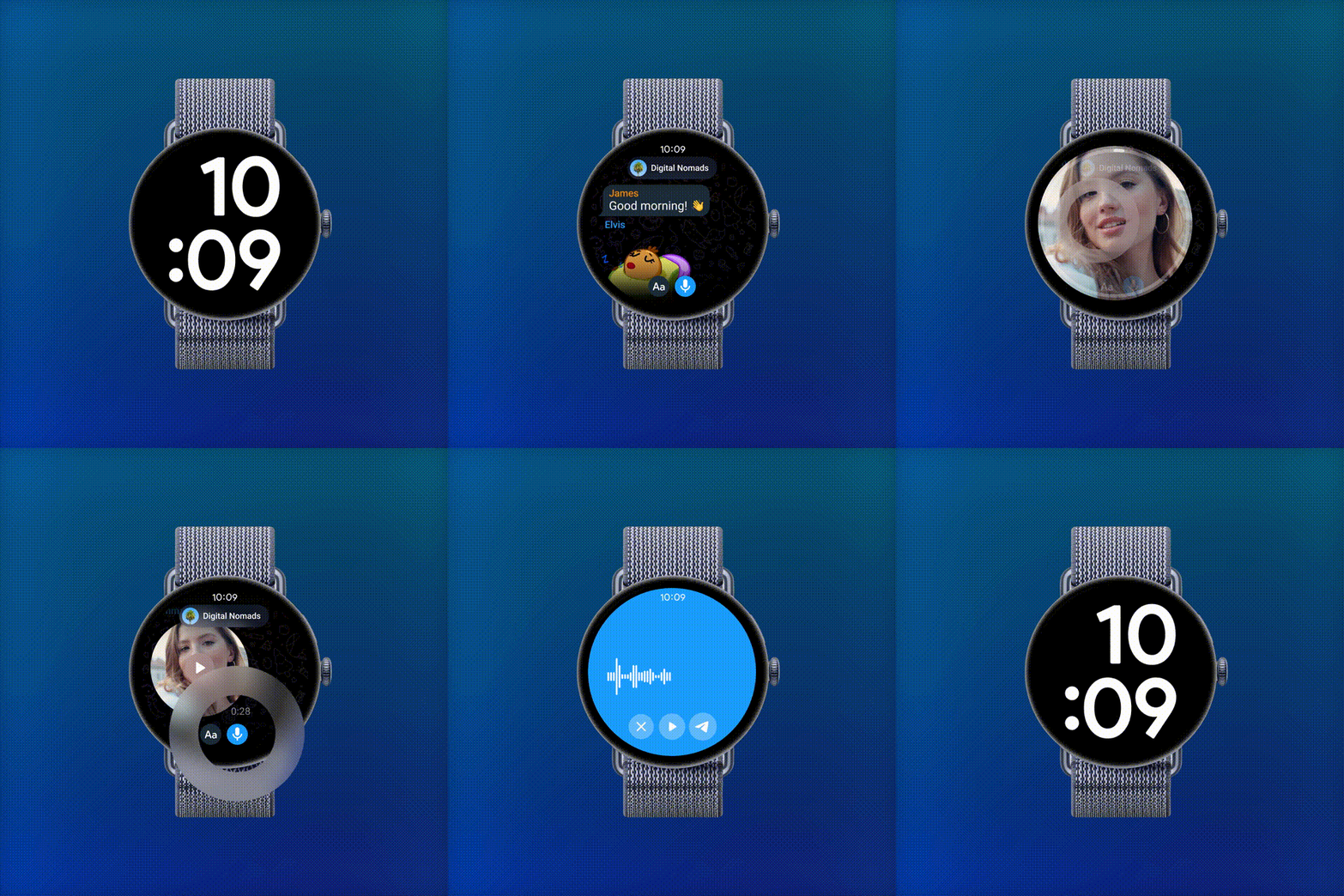
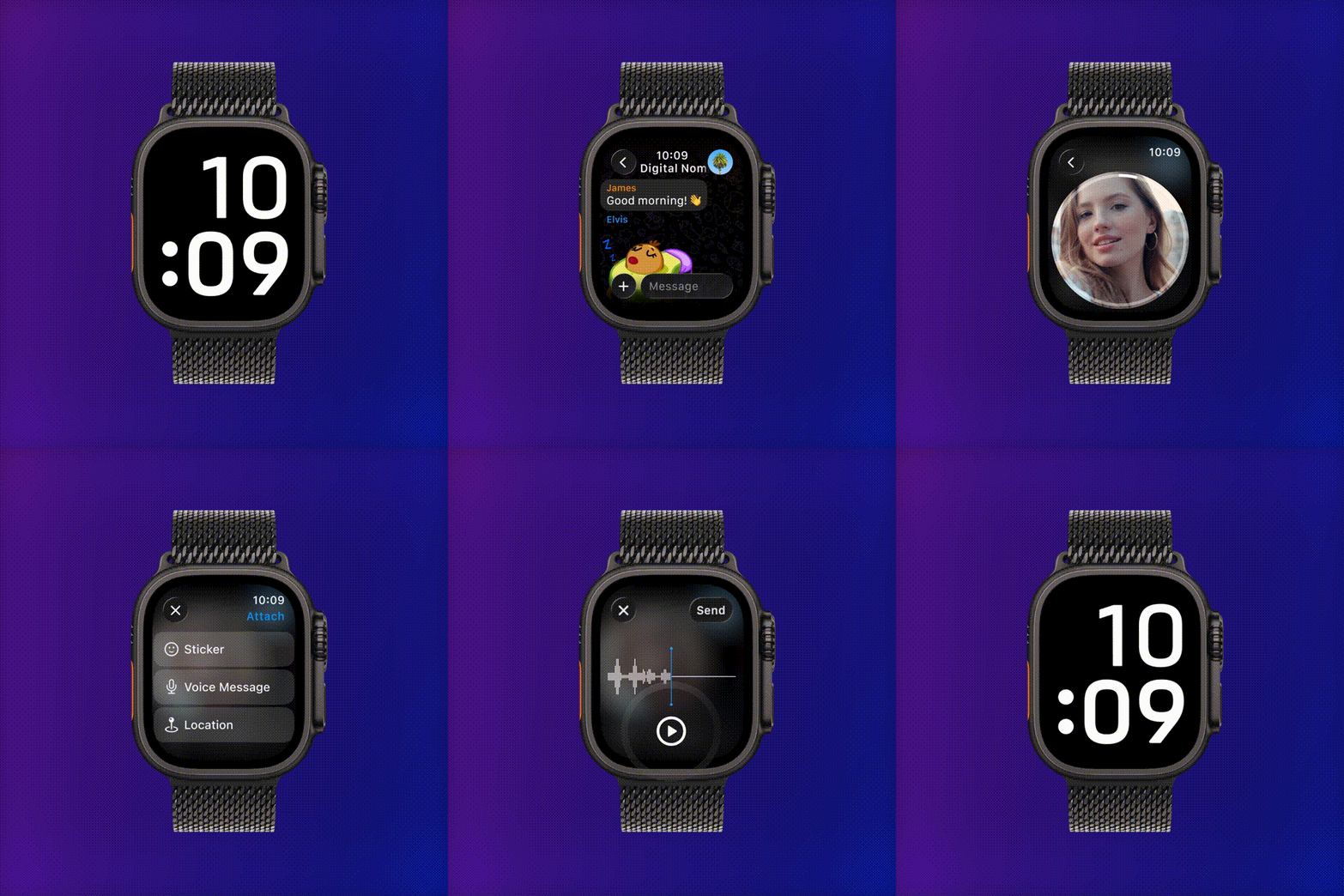
Telegram continues to impress, this time with native apps for Wear OS and Apple Watch. The messaging-app nerd in me is delighted!
These aren’t the half-baked companion apps we’ve all tried once and deleted. You can actually type replies on your wrist, send genuinely high-quality voice messages, and the connectivity holds up well. Your watch behaves like a proper little Telegram client, not a glorified notification mirror.
Wonderful, right? But there’s a detail in that last sentence that deserves a whole article: your watch is now a proper little Telegram client. In other words, a native app means another active session on your account.
That one fact changes the security math, and I haven’t seen many people talk about it. So, let’s talk about it! I’ll explain what an “attack surface” is, why a watch is a peculiar device to carry your private chats, and what both you and the Telegram team can do about it.
Let’s get started!
What is an Attack Surface? [And What Your Watch Has to Do with It]
“Attack surface” sounds like jargon, but the idea is delightfully simple. It’s the sum of all the points where someone could try to get into your stuff.
Think of your digital life as a house. Every door, window, cat flap, and chimney is a potential way in. A security-minded person (or a simply paranoid person like yours truly) doesn’t just ask “is my front door locked?” They ask “how many openings does this house have, and is each one locked?” That total is your attack surface. The fewer the openings, the easier the house is to defend. Dramatic, I know, but it’s supremely important in digital security.
So, Telegram is like your house. And every active session on your Telegram account is one of those openings. Your phone is one. Telegram Desktop on your laptop is another. The web version you opened on your work computer that one time and forgot about? Also one. (Go check Settings → Devices right now if that sentence made you sweat. I’ll wait!)
The new watch app adds yet another opening: a full, logged-in session that can read your chats and send messages as you. To be clear, that’s not a flaw. It’s just how native apps work, and it’s the very reason the experience is so smooth. Desktop and web sessions work the same way.
The difference is where this particular session lives. Which brings us to the next point!
A Tiny Computer with No Lock on the Door
Here’s the thing about smartwatches: they’re small, they’re constantly on the move, and they’re surprisingly easy to part with.
Your phone mostly lives in your pocket or within arm’s reach, and it locks itself the moment the screen goes dark. Your laptop sits at home or in a bag you guard with your life. Your watch, though? It comes off at the gym, on the nightstand, next to the sink, at airport security, and at that massage appointment. It’s a tiny computer that you routinely take off and set down in public places, often without a second thought.
And here’s the kicker: many watches spend their whole lives without a screen lock. Phone makers practically force a PIN or biometric on you during setup. (Good on them!) Watch makers politely offer one, and a lot of us politely decline because typing a PIN on a postage-stamp screen is a chore. The result is a device that, in many hands, is unlocked by default.
I checked, and the Telegram watch app itself doesn’t offer a lock either. The phone app has a lovely passcode lock feature (with auto-lock timers and all), but there’s no equivalent on the wrist. So, if someone picks up an unprotected watch, your chats are simply there: readable, replayable, the works.
Put those together and you get an opening into your account that is small, mobile, frequently set down, and possibly not locked at any level. Scary, isn’t it?
Don’t Sacrifice Security for Convenience
Am I telling you to skip the app? Not really. I’m telling you to make a conscious trade instead of an automatic one.
Convenience and security sit on opposite ends of a seesaw, and every device we add tilts it a little. The trick is to tilt it back on purpose. If you decide wrist-replies are worth it (and for many of us, they genuinely are), here’s how to install the app like a security-minded adult:
- Set a screen lock on the watch. Yes, the PIN is annoying. Both Apple Watch and Wear OS soften the blow with wrist detection, which keeps the watch unlocked while you’re wearing it and locks it the moment it comes off. That’s exactly the protection this scenario needs.
- Audit your active sessions. Open Telegram on your phone and go to Settings → Devices. (It’s under Privacy and Security à Active Sessions on Telegram Desktop.) Terminate anything you don’t recognize or no longer use. While you’re there, set “Terminate old sessions if inactive” to a shorter window. It’s a two-minute habit that I’d recommend even if you never touch a smartwatch.
- Turn on Two-Step Verification. This protects the account itself with an extra password, so a stray session doesn’t allow strangers to gain even more sessions if they don’t know your password.
- Mind your notification previews. If your watch shows full message previews on the lock screen (or has no lock screen!), anyone glancing at your wrist or nightstand gets a free read. Trimming previews costs you very little.
- Know where the kill switch is. If your watch ever goes missing, you can terminate its session remotely from your phone in seconds. Knowing that before the bad day makes the bad day a little more bearable.
None of this takes more than ten minutes. Compare that to the months you’d spend feeling icky after a stranger scrolls through your private conversations.
Suggestions for the Telegram Team: Include Additional Security Measures
I’ll say it again: Telegram didn’t do anything wrong by shipping a real native app. Quite the opposite, it’s the right way to build for watches. But the platform’s security model was designed around phones and computers, and wrists deserve a few tailored measures.
Here’s my wishlist:
- An in-app passcode for the watch, mirroring the phone app’s passcode lock. Even a simple 4-digit PIN with an auto-lock timer would close the biggest gap in one stroke.
- A “lock when off-wrist” option that piggybacks on the watch’s own wrist-detection sensors. The hardware signal already exists; the app just needs to listen to it.
- A reduced-scope session type. Does a watch session really need the same powers as a desktop session? A “lite” session that can read recent chats and reply, but can’t export data, change settings, or browse the full history would shrink the stakes dramatically. The app is already reduced, but I know Telegram to be an agile team that keeps adding features. All I’m saying is that a cap is probably necessary for these tiny apps.
- Prominent session visibility. Give the watch a distinct label and icon in the Devices list, plus a notification on the phone when the watch session is used after a long gap. Quiet sessions are forgotten sessions.
- Shorter default session expiry for wearables. If a watch session goes unused for a few weeks, it should politely log itself out. Re-pairing takes a minute but a forgotten live session on a drawer-bound watch lasts forever.
None of these would dent the convenience that makes the apps great. They’d just acknowledge that a watch is, well, different from a phone!
(And while I have you, I’ve heard a lot of people complain about your latest mobile UX choices, with the overwhelm of four icons down below and everything. Just an unrelated note from a fan.)
TL;DR
Telegram’s new native apps for Apple Watch and Wear OS are genuinely good: real typing, high-quality voice messages, solid connectivity. But here’s what to keep in mind:
- A native app means another active session, which means a bigger attack surface: one more door into your account.
- Watches are small, mobile, and frequently taken off. Many have no screen lock, and the app itself doesn’t offer one at the moment. That’s an unusually soft door.
- Don’t sacrifice security for convenience: set a watch screen lock, audit your active sessions, enable Two-Step Verification, trim notification previews, and know how to remotely terminate the watch session.
- Dear Telegram: a watch passcode, off-wrist auto-lock, reduced scope for watch sessions, and shorter wearable session expiry would be more than welcome.
Enjoy replying from your wrist, but just lock the door behind you!